DarraOwl
Your Mac awake with the lid closed, driven from your iPhone, no server
- Mac app (menu bar)
- iPhone app
- Apple Watch app
- Widgets and Live Activity
- Siri
- Command line
 App screenshots
Screen by screen
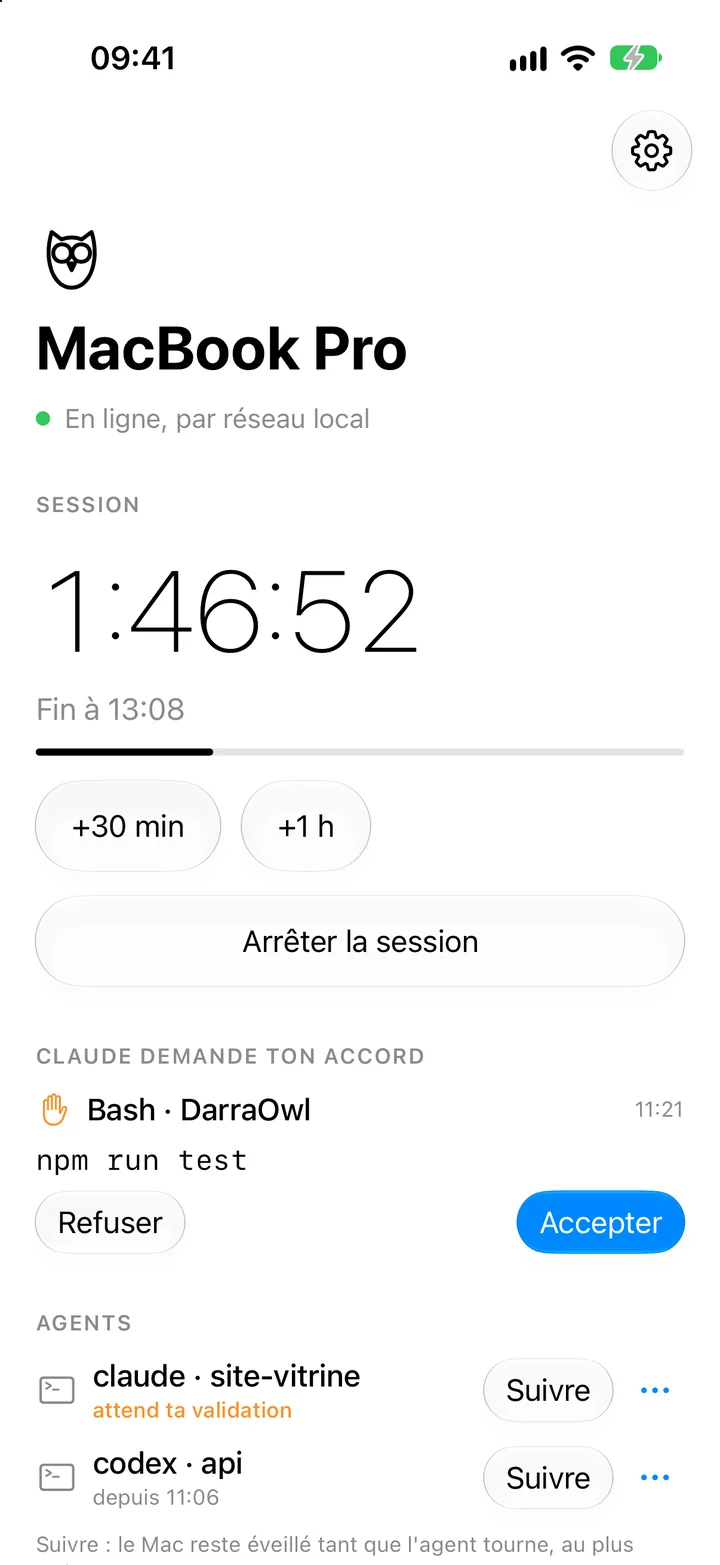
01The session in progress: time left, end time, +30 min, +1 h, Stop. A Claude Code permission request, to accept or refuse from the iPhone. Below, the coding agents.
02The Mac's terminal within reach, then the controls: Always on, lid closed too, screen off, lock, mute, resume the paused apps.
03The Mac's state: battery and runtime, temperature, lid, low power mode, network, session data, paused apps, Docker containers. Putting the Mac to sleep asks for Face ID.
04The terminal: commands run on the Mac, with your shell, in the prompt's folder. Face ID for each command, 5 minutes at most, no input.
05The settings, sent to the Mac: what happens with the lid closed, the alerts (anti-theft, Mac locked, session end, data), masked project names, the battery thresholds.
06Welcome: the three requirements before pairing, then the code to scan. It works once and expires after 5 minutes; the keys stay in the keychain, no developer server.
Role
Personal project, open source
A menu bar app that keeps a MacBook awake, lid closed, for a bounded time or as long as a coding agent is running, and an iPhone app that shows it and drives it from anywhere. Every session has an end time: normal sleep comes back at that time, even if the app has crashed. No server: the iPhone reaches the Mac directly, encrypted, or through the user's private iCloud database. Made for long Claude Code, Codex or Gemini tasks: start the agent, close the lid, leave.
What's inside
- Mac: a menu bar app in SwiftUI and AppKit; a root system component (launchd, SMAppService) is the sole owner of the session, its end time and the journal, and restores sleep at that time, when the Mac boots, and if the app has crashed.
- Every setting touched (sleep, brightness, sound, paused apps, Docker) is written to the journal before it is changed, then restored to its previous value, never to a guessed one.
- Lid closed: screen and keyboard off, sound muted, low power mode, Slack, WhatsApp, Discord and Docker paused; nothing is touched when an external display is plugged in or a call is in progress.
- Safeguards: under 40% battery, low power mode; under 15% or on a critical thermal state, the session ends; 12 h by default, 24 h at most.
- iPhone: the Mac's state live, coding agents and Claude Code permission requests, Docker, Live Activity and Dynamic Island, widgets, Siri; signed commands, unique, expired after 60 s; Face ID to sleep the Mac or stop a container.
- No server: direct TLS with a pre-shared key (local network, Tailscale), otherwise the user's private CloudKit database; pairing with a single-use code valid for 5 minutes; no data collected.
- Mac signed with Developer ID and notarised, outside the Mac App Store, which refuses a root component; iPhone on TestFlight; 390 tests across the three packages, dependencies injected, never a real system command in a test.
In detail
01Where it comes from
A long task of a coding agent, Claude Code, Codex or Gemini, starts, and you would like to leave. But a MacBook whose lid you close goes to sleep, and the task with it. DarraOwl keeps the Mac awake as long as needed, and the iPhone tells you where the agent is, whether it is waiting for your approval, whether the battery will last.
Two apps, released in October 2026: the Mac one in the GitHub Releases, signed with Developer ID and notarised, outside the Mac App Store because it refuses a root system component and imposes a sandbox that pmset cannot live in; the iPhone one on TestFlight. The code is public.
02The system component and the journal
The menu bar app does not touch the power settings itself. A small root service, installed through SMAppService and run by launchd, is the only one that does. It accepts only the DarraOwl app signed by the same developer, and it is the sole owner of the session, its end time and the journal.
Every value it changes, sleep, brightness, volume, the list of paused processes, is written to that journal before it is changed. Restoring writes the previous value back, never a guessed default. It happens at the end time, on SIGTERM and when the Mac boots: returning to normal sleep never depends on the app.
A session lasts 12 h at most by default, 24 h as an absolute limit, agent mode included. On battery, under 40%, low power mode comes on; under 15%, or if the battery becomes unreadable, or on a critical thermal state, the session ends. These rules are enforced in the system component, whether the app is open or not.
03Lid closed
During a session, closing the lid turns off the screen and the keyboard backlight, mutes the sound, turns on low power mode, pauses Slack, WhatsApp and Discord, and Docker Desktop when two checks in a row find no running container. Everything is restored when the lid opens, or on return if the session ended with the lid closed.
Pausing sends SIGSTOP to the app and its child processes; resuming sends SIGCONT, only to processes whose identity (pid, start time, Mac boot time) has not changed. The system component resumes the paused apps itself at the end of the session and when the lid opens, even if the app has crashed in between.
Two cases where it does less: an external display plugged in, the Mac is on a desk and nothing is turned off or paused; a call in progress, the sound stays and no app is stopped. Call, video and dictation apps are never paused, nor the one an agent is running in.
For the screen and the keyboard, DarraOwl goes through private macOS APIs: the public way, pmset displaysleepnow, does not hold, closing the lid turns the screen back on. Those APIs are only called on macOS 26 and 27, where they were measured; elsewhere the screen is left alone and the Settings say so.
04The iPhone
The iPhone app shows the Mac live: online, asleep or last seen at a given time, the session and the time left, battery and runtime, temperature, lid, network and the session's data, the coding agents running and the Docker containers. It starts, extends or stops a session, follows an agent, puts the Mac to sleep, manages Docker, changes the settings and the thresholds.
The phone can only trigger the fixed command list of the shared package: never a free shell command, never a file path coming from the phone. Each command has a unique id, expires after 60 seconds, runs at most once, and its result is recorded. Sleeping the Mac, stopping a container or an agent ask for Face ID, through a Secure Enclave key.
Notifications warn of a session about to end, a battery that will not last, a Mac that is heating up, a lid opened, a charger unplugged, with Extend by 1 h and Stop buttons. The Live Activity, on the lock screen and in the Dynamic Island, shows the time left, the battery and the agents; with no push server, it starts when the app is opened during a session, or when the session is started from the iPhone. Widgets, and Siri: "Extend the session with DarraOwl".
Pairing is done by scanning a code shown by the Mac, valid for 5 minutes and usable once; the keys stay in each device's keychain, and unpairing cuts access at once.
05How I use it
First case: I leave home and the Mac stays on the desk. As a freelancer you never know when you will be needed, or for what. From the iPhone I see whether the Mac is online, I start a session so it stays awake, and from DarraOwl's terminal I launch Claude Code in Remote Control on a folder, with one command: the conversation shows up at once in the Claude app on the phone. From there I ask it about what is on the Mac, a repository, a config file, the state of a project, I have it reread an error or prepare a fix, and I pick the same conversation up later, on the Mac or on the phone. When Claude asks for my approval, the iPhone shows it to me and I answer from there. If a command really has to run on the machine, DarraOwl runs it for me.
Second case: public transport, with a long ride ahead. The Mac is in the bag, lid closed, connected to my phone's hotspot, and it keeps running: that is the whole point of DarraOwl. The phone and the Mac talk through my private CloudKit database, with no server of mine. I follow the agent at work, extend the session by an hour when the ride gets longer, keep an eye on the battery and the data used, stop a task going sideways, all without ever taking the Mac out in a packed carriage. Once there, I open the lid and everything is as I left it, sound and brightness put back as before.
06No server
There is no developer server. The iPhone reaches the Mac directly when it can, over the local network or through Tailscale, in TLS with a pre-shared key; otherwise through the user's private CloudKit database, which the developer has no access to.
iCloud only receives metadata: never a file's content, a prompt or an agent's output. Project names can be masked in the settings. On the App Store listing, the answer to data collection is: none.
07What is left
The iPhone app is on TestFlight, not yet on the App Store. The private APIs that turn the screen off have only been measured on macOS 26 and 27. The Live Activity has no push server, so no remote start. And two options stay off by default, because they commit the user: staying "Available" with the lid closed, and moving the mouse by one pixel, which needs Accessibility access that only the user can take away.